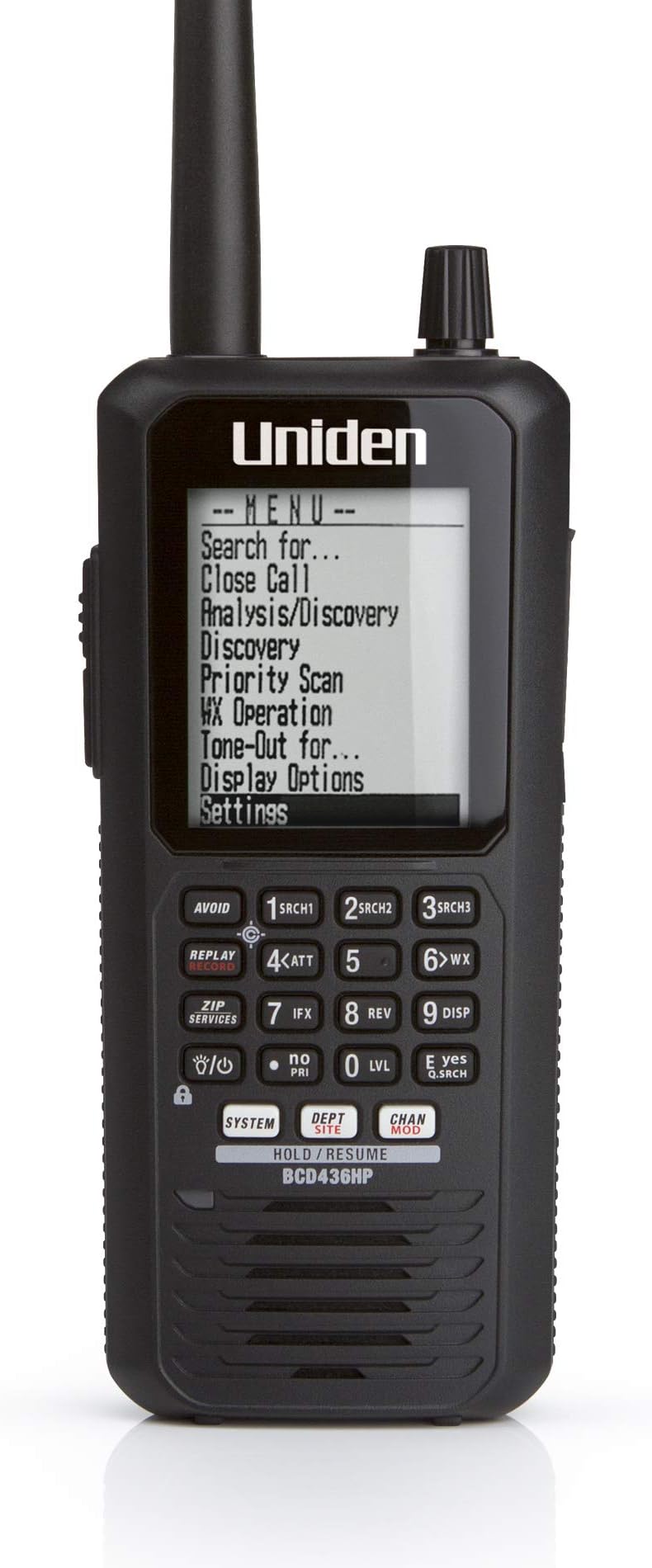
📡 Stay ahead of the signal—never miss a beat with the ultimate digital scanner!
The Uniden BCD436HP is a handheld digital scanner that combines ease of use with advanced features like HomePatrol-1, Close Call RF Capture, GPS connectivity, and an extra-large display. It scans up to 85 channels per second across multiple frequency bands, including public safety, military, and weather channels. With plug & play setup, customizable alerts, instant replay, and future-proof firmware updates via Sentinel software, it’s designed for both beginners and seasoned scanner enthusiasts seeking real-time, location-aware monitoring.


| Item Dimensions D x W x H | 2.4"D x 3.8"W x 9.02"H |
| Minimum System Requirements | Windows 7 |
| Standard Sheet Capacity | 10 |
| Connection Type | USB |
| Resolution | 1200 |
| Supported Media Type | Micro SD |
| Scanner Type | Document |
E**R
For A Busy Dad, This Plug & Play Scanner is Perfect
With over 700 reviews of this product, there is a lot of material out there. If you're like me and have limited time to read reviews, let me sum this product up for you: 1. It is plug & play. Enter your zip code and it knows what frequencies to scan in your area. Game on! 2. If you travel, buy the Uniden-brand GPS unit available on Amazon (Uniden BC-GPSK Serial GPS Receiver for Scanner and Marine Products). The reason to buy the Uniden unit is A) As you travel, the GPS feeds your location into the scanner and the scanner updates the frequencies it is scanning to those near you and B) because it is also plug & play. Mine arrived with the necessary cords to plug directly into the scanner, and it worked from that moment. Perfect! 3. You can connect the scanner to your PC to update the firmware and the frequency database from Uniden. It is easy. No need to buy a third-party web database. Uniden regularly updates their database. I purchased my unit in 9/2014 and used it nine months before performing updates. It works fine out of the box. 4. The scanner has two batteries, a main battery for scanning and a secondary battery for the clock. Charge the main battery first, then turn on the scanner to charge the secondary battery. Oddly, the clock battery charges when the unit is on. 5. On trips, an external antenna will extend your range. I purchased a magnetic mount antenna on Amazon for about $30 (ASIN B004HM9RHE) and it works great. Almost a plug & play device, you do not need an SWR meter as it is pre-tuned. Plug & play caveat: You will need a BNC Female/SMA Male Adaptor (ASIN B00CLFFM4G) to plug the antenna into the scanner. 6. When using in a vehicle, know the law. States may have laws restricting scanner use in a vehicle. UPDATE: As of May 1, 2006, a permit from the Michigan state police is no longer required to have a scanner in your vehicle on Michigan roadways. I have been told by the Ontario Provincial Police it is legal to have a scanner in a vehicle in Canada but have not been able to find the law on the books. UPDATE: March 7, 2021: A Spectrum Management Officer of the Canadian Innovation, Science and Economic Development department (Canada's equivalent to the U.S. Federal Communications Commission) wrote me that an amateur radio operator's license is required to use a scanner in a vehicle in Canada. Canada recognizes U.S.-issued amateur licenses, so if you're a licensed ham operator, you're set. 7. That's it. This scanner is as simple or complex as you wish it to be. For a busy dad, the simplicity is welcome and the Plug & Play No Fuss Ready-to-Use attributes actually let me enjoy the thing without brushing off my kids to learn how to make it work. It reminds me of the original Apple MacIntosh computer: A product so smart you can turn it on and use it without devoting hours of study to get it to function :-)
R**N
Great Unit & Future Proof
Make sure you read the review item next to the name of the user. Amazon mixes reviews of different units in one. Before I get into the scanner I would like to address some complaints in general on scanners and the frustration of programming and using them and resulting in a bad review and complaints about a scanner be it a simple scanner or a complex one. Radio systems (simplex, trunking, digital, etc) and all the frequencies assigned worldwide is a complex matrix. It's not a simple as scanning every frequency under the sun to find some activity, its more complex. And truth be told 95% of scanner enthusiast like the complexity as it adds to the hobby. Learning and gaining knowledge and always figuring out new tricks, etc. If it was simple it would not be a fun. But there are some who want quick and easy. So you must to 1 of 2 things. 1: Make sure any scanner you purchase you can hook up to the computer (some use serial so be patient) and use FreeScan software (free) and subscribe to a frequency database. It's cheap and worth it. I paid 30 a year that's pennies a day to have an awesome database at your fingertips. This will load and label all the systems in your area and put them on the scanner. 2: Purchase a more expensive with a built in database and other features (like this Uniden 436HP). Even if you do #2 it's always good to do #1 also. And be patient. While watching TV or hanging out, mess with the scanner nightly and learn little things as you go. Watch some videos on YouTube like Scanning 101, etc. Enjoy the process and do not get frustrated. On to my quick review of the BCD436HP. I had purchased the BC346XTC and used it for a week. Great unit highly recommend if you want analog with trunking. I wish the display was bigger so you can see more of the 3 areas system, dept and channel. But it worked great and I rated it 5 stars. But I wanted something digital with a larger display so I plunked out more than double the price of the BC346 for the BCD436HP. Love the large display, it really shows a lot. A separate line for the system, department and channel which you can hold each one and scan subs of them. When I first turned it on I entered my postal code and was scanning in minutes. The BC346 I had to manual scan or load it with FreeScan to get it really working. I have not hooked the BCD436HP to the computer yet but will this week to load detailed databases. This has a ton a features and essentially has unlimited channels (no cap). Firmware will future proof this unit. It pretty much does everything (trunked, digital, etc). The Micro SD card is a great feature to load a ton of databases and this unit will record and playback transmissions. Some users commented on the cheap feel of the unit. That's a slippery slope with a lot of opinions. Its light weight and feels good to me, the plastic is not super tough industrial but Uniden most likely weighed the pro and cons. Example: A Motorola VHF 2 way 99% of the time will be used in a work environment and be dropped, thrown on a dash or ledge, etc. That is why they also do not put displays on most of them for durability. Now a scanner is typically a hobbyist device and I can imagine 95% of the time it would not be used in a rugged work environment, so to me Uniden chose well with light weight plastic. The display screen plastic seems like it may get scratched easy but I have not had it long enough determine that. Some people do not like the Uniden clip on the back since it sticks out, but if you see why they did that it nice. It's basically the same CB mic mount to when you take the clip off it slides real nice into a CB mic mount. I bought a CB mic mount and use it in my van. Very nice feature. Battery life is dependent on processing, led, etc. I have not used it long to determine but if I had to charge it every night no big deal. Bottom line with anything you buy there is always things some people like and others do not. Is this unit a little pricey, probably but then it has a lot of R&D in it and they do not sell tons of them so there has to be a price point to make money. So I am ok with the price. You basically have a little computer in your hand ready to scan the RF Spectrum and should be future proof for a long time. If your trying to figure out if you like scanning buy a smaller Uniden or Whistler and program it via your computer and check it out. If you want to move up into the full spectrum (trunking, digital, etc) then you need something like this. I would recommend this to someone who knows what they want and ready to shell out a few bucks. For a beginner maybe start smaller. I had a chance to mess with hooking this up to my computer. Turns out the FreeScan does not support this unit. BUT Uniden makes free software for this called Sentinal which has a real good database with it. Its all installed on the 436 already so you really do not need to use the software unless you want to make easy edits or import stuff from freescan, etc. Sentinal software may not be as in depth for the hard core seasoned scanner users but for me its good. So in reality the BCD436 is a unit that will have you scanning in minutes with little to no programming and has the capability for the seasoned users to program till the cows come home. Update: I love this scanner. The screen showing all the info is great. The hold for each area is awesome I cannot say enough about that. I have NOT needed software like on other scanner I have used. Maybe I will one day but Uniden shipped this will ALL the frequencies in my area and nationwide for the most part!
R**.
BCD436HP A winner!!
I recently Purchased the BCD436HP Scanner as my local PD switched to digital. I have to say this is the best scanner I've ever owned. It's amazing how much technology changes and how many features are included with this scanner. I chose this scanner over another brand just because I've owned Uniden's before. And I wanted the keypad interface. A scanner without it is useless to me. Now I have read some of the negatives of this unit. Frankly some of them are gripes but for me they are not a deal breaker. The advantages far out weigh the negatives. One thing I was concerned about was some people said that the Conventional frequencies are not strong at receiving. I live in the suburbs of Chicago and pick up Chicago P.D.that is over 30 miles away inside my house with an Diamond SRH77ca antenna. Anybody who knows anything it's hard to build a dedicated receiver to cover so much and be sensitive to all frequency ranges. I'm happy with the performance. As far as programming, I'm an IT professional. Anyone who has worked with trunked systems before know that it gets more complicated than conventional frequencies. There were many new things that I did not understand how this scanner did. However I'm learning them day by day. And it's fairly easy once you poke around enough. Im finding it very easy to program and use. Pro's: All frequencies covered Digital, Trunking, Conventional Recording feature Big Display Close Call Capture Technology Computer Programmable Keypad Unlimited Frequencies storage GPS Capable Zip Programming Negatives: Display can be hard to read at times due to glare but, You just tilt the radio downwards. Adjust the brightness and contrast. Some of my ham radio's suffer the same curved screen problem. Better Manual Needed. But Was fairly easy for me to figure out. I don't think the Internal battery charger is timed. So possibly overcharging of batteries. Internal clock needs to be set if you don't use scanner frequently enough. Firmware update allows it not to bother you to set it anymore. But when you go to do your record feature for example it will store the wrong date/time on recordings if time was lost.
R**Y
High End Digital Scanner With Steep Learning Curve
This is a scanner made for scanner techies, not for the inexperienced. It has an overwhelming assortment of bells/whistles and is not easy to program. It took me a month or so of working with it to really understand all the settings. You can get lost, lose track of channels you have in the Quick key layers and it is a frustration device like a sudoku puzzle. But as a genuine high end digital scanner for the hard core scanner fan, or RF engineer who likes to fiddle with settings, it is fantastic, once you get it properly setup. But that is a real challenge. You can use Uniden's Sentinel Software this comes free and it works okay, but you will end up with many old/unused channels or far too many duplicates to be useful if you use the zip code method. The best way to program this is to setup your own Favorites List and start adding things one piece at a time from the database. But if you drill into the database in a big metro area, you'll wind up giving up in a fit of confusion! Thousands of channels listed, hundreds of channels show up buried in multi layers of layers. Which is why you need to really research the Sentinel database before you program this. You can download the Sentinel software from Uniden first off their website and decide if you can do this. Updates are free and current from the Radio Reference database. You'll never have out of date stuff. You plug this scanner into a USB jack like a flash drive and the computer finds this as a storage device. But don't ever pull the USB cable out before you tell windows to eject this device or you'll corrupt the SD micro card inside the scanner. The BCD436HP has a few current bugs. The first bug is related to this SD card corruption issue, the second possible bug relates to the backup battery for time, Uniden has a current update fix for this. The other bug is a possible dimmer display over time. I have had this unit for two months and have not had any problems so far. Be very vigilant about first "Ejecting the Storage Device" on your PC before you pull out the USB cable and shut if off before the batteries get too low because it has to write to/close the SD card when you shut if off. Also, firmware updates will come thru Uniden's Sentinel Software for free as well as the database and and other updates. I had no trouble at all with my PC finding the scanner. For digital reception on P-25 systems, this scanner is hard to beat for legible Voice Quality. But my new Uniden BCD325P2 scanner will equal this unit side by side. This unit will do P-25 (Phase 1 & 2) but I get fantastic reception with Phase 1 (so far) in my area. The VHF/UHF reception is about the same as my other units, as good as you'll probably ever need. If you want the best digital reception, buy the RS 800 mhz antenna, which also does very good for VHF/UHF. This unit runs on 3 AA batteries which they include, one of mine was a dud, get a cheap battery checker, buy a spare set of 2400 NiMh and a good slow charger. Don't charge in the radio, the batteries may get hot. You should get 8 or more hours off a fully charged set of 3 AA batts. As far as the large display goes, the letters are very narrow and very thin and very crowded. It is hard to see it good at a few feet with eyes over 40 years of age. There is a slight duplication of info on the 3 fields, really a great deal of info on the screen, but your eyes can't take it all in at once. I found that if I re-do all the channel names/labels in All Caps and just use less letters, you can see the display much better. But you will have to go in and re-do this work yourself by hand, the database channel names do not appear in Caps. Just keep the info fields to one line if you can and it shows up clearer on the display. The display does not alternate/blink like on other scanners either. It is not a world class display for such a high end scanner. But it does tell you everything about the channel you are listening to. The scanner also has 3 Hold buttons, but no Scan button, (it is the System button). It is quite tall and tip over prone. You can program it by hand but you will really need to know your frequencies/systems in your area first and you'll quickly get overwhelmed. This is not a user friendly scanner, but most digital scanners are pretty much all complicated now compared to old style analog scanners. This is a Fantastic Scanner for RF engineers and tech geeks, at the risk of being highly complex for the general public. You need much more patience than money. Set it up right and you'll get a wonderfully amazing scanner gizmo, but the learning curve is extreme. There are many things about this scanner that you can fully screwup by just missing particulars in the programming. You'll wind up with it saying "Nothing To Scan" on the display and go back in programming and do trial and error and wind up with the same result. Over and over. Or miss complete services even when you have them programmed in! I programmed it 5 times over before I fully understood this thing, and I'm an RF engineer. But it does have incredible reception on P-25 systems and if you want extra bells/whistles to play with, this is for you.
T**1
Should have never been released
Like another reviewer stated that it has more bugs than a roach motel is true. Uniden knew this when they announced they were coming out with it back in November. They released it anyway in January! Profits before performance! Uniden said it is WI-FI capable and it is not. Not yet! Maybe never! It does come with a WI-FI dongle but it is useless at the moment.They said you could use an app for either Android or Apple devices. You can not because the app is still in development.Or so it is said. They knew this when they released this scanner but did not tell anyone about it OR that the analyze function that they highly advertised does not work either. These were 2 of the main features why I purchased this scanner.Their website has no mention of the analyze function not working but they still have it on their site as being available on this scanner. Oh it is there. It just doesn't work. Their website also says the app for the WI-FI will be available 1st quarter of 2014. It is now May 25th. I purchased mine near the end of February and realized that there was no CD with it that contained the app. I immediately started searching the Internet to find out why there was no app. If you go to [...] you'll find all the questions and answers you'll need to make your own determination as to purchase or stay far away. I kept mine thinking that Uniden would release the app and have a fix for the analyze function by the end of the 1st quarter. But the time has passed for me to return it so I'm stuck with it. You can use it as a functional scanner but I along with countless others paid for features we didn't get and probably never will. Uniden will not answer emails either. Purchase the scanner and then try to find out info about it.Not one email was ever answered. I personally will not buy another Uniden product of any kind. Period! They're dead to me. I would bet my last dollar that there will be a class action suite over this. Check out the Uniden forum at radio reference and see for yourself how many other unhappy customers Uniden has. I also personally think that the good reviews are from people that didn't want/need the unavailable features or are affiliated with Uniden to try to boost sales. There are people in the forums that constantly belittle the people that complain that Uniden is doing nothing and not listening to them. You know the people that paid $600 dollars for something and didn't get what they paid for. I call them customers. Those people will think long and hard before buying anything with a Uniden label on it again. Update 7/29/2014 7 months have passed since the release of this scanner and there is still NO Wi-Fi/Siren App or Analyze function. Yet everywhere you look, including Amazon.com, they still advertise these features. WHY! Do they enjoying making customers mad and have to deal with returns once the customers realized they've been lied to. Or they've had their head under a rock since January! Uniden is still not returning emails or taking calls regarding this scanner but Uniden continues to send their propaganda emails advertising! Our government is always wanting to get in on everyone's business but never there to protect the consumers from liars and thieves! Update 2/3/2015 Here we are over a year since it was released and still DO NOT have the features that were advertised. A YEAR! REALLY! And to add another slap in the face from Uniden, the 1 year warranty will be expiring soon. So once, I mean IF, these features ever do materialize and something goes wrong, then good old Uniden will happily charge you/me for out of warrenty repair. It's a win/win for Uniden and a loose/loose for us! So to all that went ahead and purchased this while ignoring the those of us that tried to save you your hard earned money and a lot of headaches, I TOLD YOU SO! So much for consumer protection laws. But I have said before Uniden is dead to me. Yeah I got screwed along with a lot of others but I will make it my life goal to bash Uniden until I take my last breath or they go out of business! I sure hope I'm around to see it!
M**O
BCD536HP Works Great! Almost Too Plug and Play. Some assembly required!
Works Great:I have had this for 3 months without a glitch. If you need to listen to a Motorola or Harris P25 public safety system this is the best way to go for most people. Previously I was using a Motorola Spectra to listen to this system in analog mode (I have skills). But the county switched to P25 and shut me out. So this Christmas after a long delay I treated myself to a BCD536HP. Pros: Very sensitive receiver Receives analog and P25 digital and capable to upgrade the common digital modes Provoice and DMR at small cost. Small, well appointed controls, WiFi connectivity for Android and IOS. Powerful audio (when used with an external speaker) Easy to upgrade firmware and channels using Sentinel. Cons; You will have to get latest firmware and channels using Sentinel to get started. Not hard to do, it requires a PC and a USB cable (supplied). Ditch the internal speaker, plug in an external communications speaker 3 or 4 inch diameter. Getting Started Programming can be somewhat frustrating for the newbie. I am used to programming commercial LMR radios and understand all the parameters. So I would say I am "expert", however this experience turns out to be unneeded and perhaps misleads me. This radio is quite different in that Sentinel will download a fire hose full of nationwide channels. Your radio will require you to provide your Zip code (or connect optional GPS) and it will activate all the systems in a radius you provide. This will probably be way more than you need. The solution is to use Sentinel to create a Favorites List and use Quick Keys to activate only the channels or systems you wish. Otherwise you will spend a lot of time pressing the Avoid Button to ignore the dog catcher (no kidding). The database comes FREE from www.Radioreference.com Visit that site, the forums etc, and learn about the system you wish to monitor. Simulcast Systems You will hear a lot of favorable and unfavorable things about this receiver. The largest complaint is the reception of P25 simulcast systems. It is true that the scanners available today (Both Uniden and Whistler) use a "discriminator" to decode the P25 signal. This is not the best way to decode P25 in a simulcast system. The best way is a DSP receiver, and you can only obtain that by buying a Motorola, Harris radio (which you cannot legally program properly), a Pricey Unification Pager, or set up a software defined radio (for geeks). Personally my experience is that my radio works fine on my local simulcast system and I am in an overlap area. Occasionally the bit error rate is high and the audio garbles. P25 itself is not a perfect mode and you will find dispatchers and officers sound like the have marbles in their mouths. It is the nature of P25. If you have any concerns contact local users and ask them their experience with this scanner in your area. Encryption If your local agency uses encryption on some or all of their talk groups you will NOT be able to decode them. The radio lacks an encryption card and even if equipped you would NEVER be able to obtain the lengthy 256 bit key. It would be illegal as well. If I haven't scared you off, you will be very pleased after you get it up and running. Uniden also makes a portable version of this radio, the BCD436HP. I bought the mobile/base version as then I do not have to worry about batteries and the BCD536HP has better shielding and so receives with less noise.
A**R
Glad I Got It Programmed Professionally
After messing with it for a couple days and not getting anymore signals than my 5 year old analog bearcat scanner I nearly returned this as I could not justify spending over $500 for something that does the same thing as a $100 unit. Despite reading online, downloading Sentinel, and watching 100 You Tube videos I still couldn't get anything other than my local analog fire department. Then I searched Facebook Marketplace and found Frank The Scanner Guy in Ohio. He remotely logged into my computer and had the scanner barking with channels I never heard before within minutes for a great price. I highly recommend you look him up if you need programming. Great scanner when you know how to work it!
N**M
Pricey but it does what it promises
well it was expensive but it was worth it. My husband has wanted to listen to local police and sheriff calls for the longest time. I researched for months looking for a P 25 capable device. Write out of the box we were able to get it to work and to get the right signal or frequency or whatever you call it. And we discovered that ChatGPT can actually give you guidance on how to program the thing. My husband is delighted with his gift and I am happy to see him having such a good time with it! Yes I think it costs a lot of money, but the good news, (aside from the crummy battery life, which what we do is run it directly plugged into the wall, and I bought rechargeable batteries and charger for them) but aside from that the device works it has an excellent range.
Trustpilot
5 days ago
1 month ago