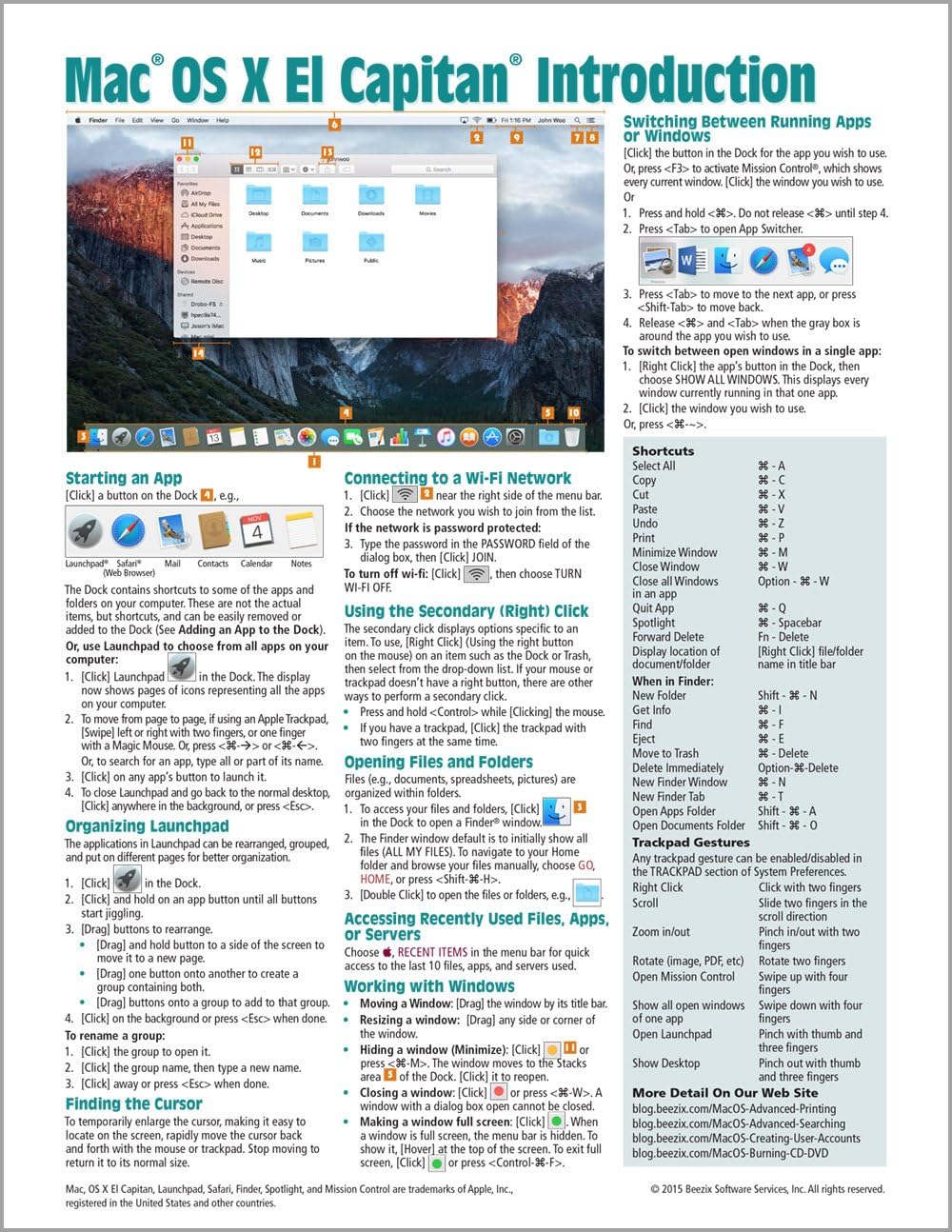

Mac OS X El Capitan Introduction Quick Reference Guide (Cheat Sheet of Instructions, Tips & Shortcuts - Laminated Guide)
Product ID: 21164849
Four page laminated quick reference guide showing step-by-step instructions and shortcuts for how to use Mac OS X El Capitan. Written with Beezix's trademark focus on clarity, accuracy, and the user's perspective, this guide will be a valuable resource to improve your proficiency in using Mac OS X El Capitan. This guide is suitable as a training handout, or simply an easy to use reference guide, for any type of user. The following topics are covered: Starting an App (a Program); Using the Secondary/Right Click; Connecting to a Wi-Fi Network; Opening Files & Folders; Working with Windows; Adding a Printer; Using Stacks (Folder Shortcuts in the Dock); Finding the Cursor; Adding a Printer. Accessing Recently Used Files, Apps, or Servers; Switching Between Running Apps or Windows; Viewing Two Windows at the Same Time; Quitting an App; Quitting a Frozen App; Adding an App to the Dock; Moving the Dock; Hiding the Dock; Hiding the Menu Bar. Searching with Spotlight; Using Dictation; Using Text to Speech; Using the Dictionary; Using Notifications; Using Special Characters. Using Multiple Displays; Using Spaces (Virtual Desktops). Using the File System: Changing Views; Renaming Files or Folders; Sorting Files and Folders; Previewing Files Using Quicklook; Creating a Folder; Selecting Multiple Items; Moving or Copying Files or Folders; Using Tabs in Finder; Quickly Sharing Files or Folders; Compressing Files or Folders; Tagging Files or Folders; Deleting Files or Folders. Copying the Pathname for Files/Folders. Using the System Preferences; Changing Login Password; Adding Internet Accounts; Unlocking Settings; Managing Extensions; Changing iCloud Settings. Converting a File to a PDF; Taking Screenshots. Installing New Apps: Finding and Installing Apps in the App Store; Updating OS X & Purchased Apps; Other App Sources. Ending Your Computer Session. Includes a List of Keyboard Shortcuts, Trackpad Gestures, and links to blog posts for more detailed subjects. Other related titles are: iOS 9 Introduction for iPad, iPhone, and iPod touch (ISBN 978-1944684037); iOS 9 Mail, Contacts & Calendar for iPad, iPhone, and iPod touch (ISBN 978-1944684044); Mac OS X Mavericks Introduction (ISBN 978-1939791061).
| Isbn 10 | 1939791685 |
| Isbn 13 | 978-1939791689 |
| Item Weight | 0.798 ounces |
| Language | English |
| Print Length | 4 pages |
| Publication Date | November 16, 2015 |
| Publisher | Beezix Inc |
User
must have....especially for first time MAC OS users
this thing was useful from day 1!.....especially for someone who has never used a MAC OS. Most things are pretty easy and just require common sense from those of us who have been exposed to the OS world over the years/decades but some of the simple things can be very frustrating when they just do not do them the same way as you've always done them with windows. all-in-all the MAC is AWESOME and this find on Amazon was too!
User
Great reference guide!
Great reference guide, it's easy to understand and follow!
User
Very Useful
Great little quick reference for Mac OS X El Capitan new installation. Very handy
User
Worth It
Great for quickly looking up how to do something. Saves me from having to thumb through pages and index of my books to find some not often used item (and not often indexed). Well worth it. Need one now for my iPhone and iPad.
User
Very useful quick guide
Very useful quick guide. It helps to refresh things you've forgotten and sets you quickly on the path to new discoveries.
User
Reference, checked...
After finally switching over to Apple and a MacBook Pro from over 30 years of Windows PCs, this reference card has made the transition much easier. I like the fact that the card is rugged and laminated so you can easily take it on the road. Excellent purchase and high training value.
User
It is very good to have such a wide range of information in ...
It is very good to have such a wide range of information in an equally handy format available for a new user to Mac OS X El Capitan.
User
For just a quick reference sheet it is pretty handy. As this is my first Mac
For just a quick reference sheet it is pretty handy. As this is my first Mac, I've used the sheet quite a bit.
Trustpilot
1 week ago
1 month ago