
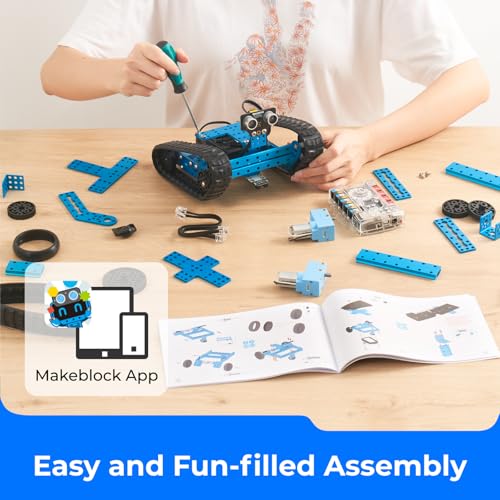

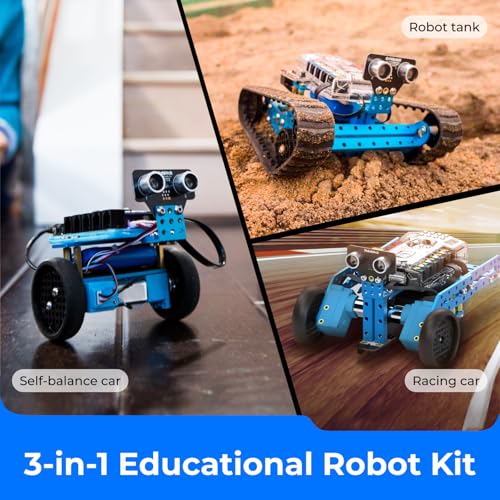

🤖 Unlock your inner coder with the ultimate 3-in-1 STEM robot kit!
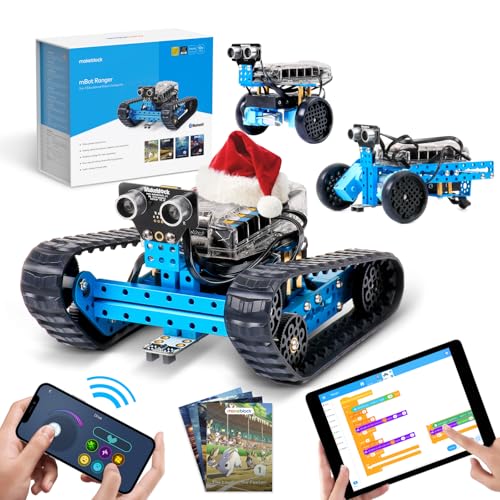
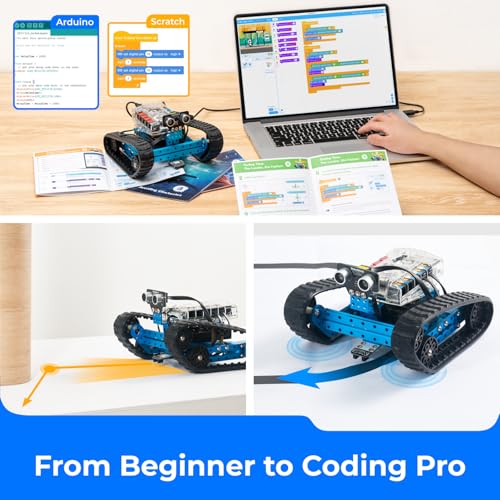
The Makeblock mBot Ranger is a versatile 3-in-1 transformable educational robot kit designed to teach programming through drag-and-drop graphical coding and wireless control. Featuring 16 interactive lessons, clean wiring, and compatibility with over 400 Makeblock parts, it serves as a powerful STEM gateway from beginner Scratch programming to advanced Arduino coding. Powered by 6 AA batteries (not included), this 1.6 kg metallic blue robot is perfect for kids and adults eager to explore robotics and coding in a fun, hands-on way.


| ASIN | B01DY3OTHO |
| Batteries | 6 AA batteries required. |
| Batteries Required? | Yes |
| Batteries included? | No |
| Colour | Blue |
| Customer Reviews | 4.3 4.3 out of 5 stars (732) |
| Date First Available | 7 April 2016 |
| Finish | Metallic (not shiny) |
| Item Package Quantity | 1 |
| Item Weight | 1.6 kg |
| Item model number | 90092 |
| Manufacturer | Makeblock |
| Material | PC |
| Number of Pieces | 1 |
| Part number | 90092 |
| Plug format | type_cef_2pin_eu |
| Power source type | Battery Powered |
| Product Dimensions | 21.85 x 16.5 x 12 cm; 1.6 kg |
| Shape | Novelty |
| Size | 4.7244 inches |
| Special Features | Portable |
| Style | mBot Ranger |
| Voltage | 1.5 Volts |
| tech_spec_battery_description_toys | Not Included |
M**L
Awesome toy and STEM learning robot. Well worth the money.
Simply the best STEM learning tool ever and also rocks as a toy. The extensive learning materials available on the Makeblock website are fantastic. Really well thought out. Every school should have these! They also use a modified Arduino board which means you can potentially use this robot to 'make' anything you want. It's a huge step between using Scratch (visual programming) in schools to coding in C++, but his is an excellent gateway to realise possibilities for the future. The route would be mBot using mBlock (based on Scratch 2) >> coding Arduino >> coding C++ or other languages. I gave this 5 stars because I'm certain most bots are made well (esp according to the blogs). Mine needed some modifications to the front wheels (Ranger) because there was a tiny issue with free movement. I doubt you'll have that issue as I'm sure it was a production blip, but if you do then it can easily be sorted by: - gently file out the holes on the front wheels so the brass coloured spacers literally drop in and out (nice and loose) - pop a tiny washer in between those brass spacers so they didn't bind on the outside of the wheel - position the drive wheels one hole further towards the front wheels because the belt was too tight (instructions could be slightly wrong) This won't power up with conventional AA household batteries. Get down to the shops and buy some proper rechargeable Ni batteries designed for remote control toys. Possibly add in some oil to wheel spindles too, then it whizzes all over at speed! You wont' regret it. PS: if you program the robot, then when you're done wth your program and you want to control it again using the phone App etc, then simply remember to 'update firmware'. This replaces your program with the original so it can be a toy again. The instructions are too clear on that.
Z**N
Five Stars
Perfect toy for enetring the world of basic programing, kids and adult.
C**R
Five Stars
Great fun to build and lots of built in software.
S**R
Great potential, bit frustrating and our instructions were in Spanish.
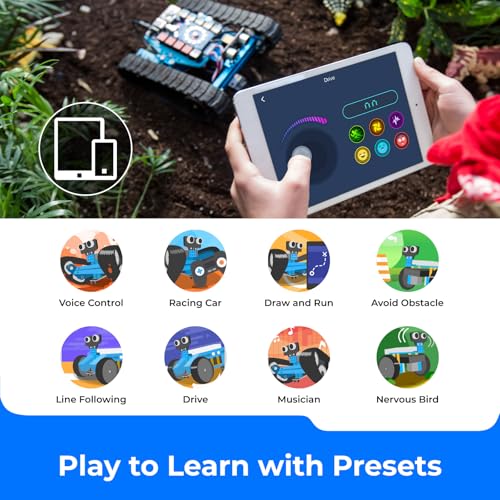
Our 11 yr old daughter loved building this and completed the first of the 3 models quickly. Be warned, with our purchase the instructions were in Spanish (nothing in the Amazon description to warn us of this) - although the pictures are good enough to build the bot. However, we've hit a few technical issues with the bluetooth frequently not connecting (ipad ios9 and iphone6 ios10) and the Arduino coding on the app not exactly being self-explanatory... which is where we'd need the instruction book to help us, but it's in Spanish. Definitely needs a patient, thorough, curious type of child to stick with this - especially at £150. There seems to be loads you can do with the programming (voice instructions, avoiding objects, following a line on paper, changing the LED colours it has, etc) or you just control it like a radio-controlled model and there are 3 different versions of the model to make and remake. After 2 days we're impressed, but a bit frustrated.
J**E
Good gift for young kids
Kids absolutely love it
B**N
Excellent
Great value and great fun... what more could you want
M**G
Superb 3-in-1 educational robot kit for beginners and a great introduction to computer programming
This is a superb educational toy. It is the sort of thing that may get your kids interested in electronic engineering and/or computer programming. This mBot Ranger is the big brother of the mBot . It is worth taking a look at that too, especially if you prefer a cheaper model. Key differences between the mBot Ranger (which I will call the “Ranger”) and the mBot are: • Both can be controlled via tablet apps. At the time of writing, only the mBot can be controlled via a smartphone app because the Ranger’s smartphone app is still under construction. By the time you read this, the Ranger’s smartphone app may have been released. • The Ranger has a more powerful chip. • The Ranger has 10 motor/sensor ports; the mBot has 4 sensor ports. • The Ranger has six on-board sensors: Light sensor, ultrasonic sensor, line follower, gyroscope, temperature sensor and sound sensor. The mBot has just three (light, ultrasonic & line). • The Ranger has 12 LEDs; the mBot has 2. If this is a present, you need to add 6 AA batteries as they are not included. *THE THREE ROBOTS* This robot can be changed into three different designs: “Land Raider”, “Dashing Raptor” and “Nervous Bird”: “Land Raider” has caterpillar tracks (i.e. tank tracks) so it is much better suited to traversing rough terrain. Like any tank, caterpillar tracks mean that it travels less quickly – which perhaps explains why “Dashing Raptor” has wheels instead – two powered wheels and a caster wheel. "Nervous Bird" has two wheels. It constantly uses feedback to correct its balance, which means it jitters. That would explain why the marketing men have turned this to their advantage by calling it “nervous” – quite ingenious. So, to summarise, the three robots are: tank, 3-wheeled car and self-balancing car. *GENERAL COMMENTS* I have used breadboards to build basic circuits – they can be quite frustrating. If one component is one position out on the breadboard then your circuit does not work. This is SO much easier to assemble, difficult to assemble wrongly, faster to assemble and far more sturdy once built. What is great about this is: • There’s no soldering. • The wiring system is colour-coded. This makes it harder to connect a component to the wrong port (which at best means your robot won’t work and at worst could damage the component). • The cables and connectors are robust so they should take quite a bit of abuse. I get the impression that the manufacturers were planning for school and community use where things get treated roughly. • Similarly, the chassis is made from thick aluminium – it is sturdy. • It’s fun to code i.e. to programme the three robots. • It has a Bluetooth module so you can control it from your tablet using the free app. You can code in two ways – with mBlock or Arduino IDE. You – or rather your kids - will move from the former to the latter. mBlock stands for “Makeblock” which is a graphical drag-and-drop programming tool based on “Scratch”. Scratch is a programming language that is remarkable easy to learn, and is taught in schools. Your kids may well learn it at primary school. Once your child wants a bit more of a challenge he or she can progress to programming in Arduino. It’s a superb educational toy. I received a complimentary product, without obligation to review it. I promised that if I did review it then it would be an honest and unbiased review.
T**.
Three Stars
Still in the box since Xmas 🤔
E**A
Calidad y gran precio
I**A
This review is for the first version mBot Ranger, the next generation should be shipping from Amazon in August of 2016 and should be even easier but it is no reason to wait to order. I purchased three different Makeblock robot models for our three girls. This mBot Ranger is for our middle girl who is 9 years old. The first build was the tank. I let my daughter do the complete build on her own although I did tighten a couple screws when she was done. I was there the entire time to guide her and explain the instructions but she did the wrenching, had fun and it was good father daughter time. The build was easy for her but not too easy. We mistakenly put the larger wheels on the rear of the treads which made the treads too tight. Once this was fixed we downloaded the MakeBlock app on the iPhone and were ready to go, or so we thought! The app said that we needed to update firmware so I downloaded the Makeblock app on a windows laptop, connected the bot via USB and attempted the easy update but it failed. After much troubleshooting I ended up changing the MakeBlock App Board setting from mBot to Auriga and was able to update it fine. Once this happened it was off to the races, literally. The next evening my daughter disassembled the tank and built the self-balancing “Nervous Bird”. This did not take her very long and she did it without my knowledge so she had no help. She likes the “Nervous Bird” so much that she has not built the race car yet but she did help her 6 year old sister build the mBot starter without help as well. I would like to point out that this is not just a remote control toy you take out of the box and play with. These are made to build and learn from so the problems we ran into are all part of the experience. When we got stuck I combed through the forums and found the answers or just tried different things. Now that the sample builds are functional we can get into the programming in Scratch, this is where the real fun will start. If there was any fault I could point out it would be that these robots eat through AA batteries so I did order a couple 12v, 6000 mAh rechargeable Lithium battery packs for the bigger robots. This should supply more and longer lasting power! The couple of challenges we faced in this build, I believe you can quickly and easily overcome by reading this review. If you run into a problem we did not, the MakeBlock forums are a great place to find the answers. You will just have to sift through posts from people who gave up or expected this to be handed to them. Each of our girls love their robots. This is a good introduction to robotics and a great platform for learning programming and the Arduino.
A**E
The product is poorly designed, motors have barely enough room to fit, needing to fuss about trying to avoid opposite power connectors from touching each other. Product comes with minimum to no instruction. Item does not work correctly on drive mode, specially as an all terrain vehicle, as the track places strain on motor/s, causing it to limit its movement and beep after each short action. Not worth the money!
T**X
J’ai acheté ce kit mBot Ranger pour ma fille de 12 ans et nous en sommes très contents. C’est un excellent ensemble pour apprendre la robotique et le codage de manière ludique. Le fait de pouvoir construire 3 robots différents à partir des mêmes pièces rend l’expérience plus variée et encourage la créativité. Le montage est intuitif avec des pièces qui s’emboîtent bien, et les instructions sont claires. Ma fille a réussi à assembler les premiers modèles avec un peu d’aide au début, puis de plus en plus seule. L’aspect programmation (via l’application / logiciel) est un vrai plus : elle peut créer ses propres commandes, programmer des mouvements, des capteurs, etc., ce qui rend l’apprentissage concret et amusant. Points forts : Très complet pour un kit éducatif Apprentissage du codage interactif Possibilités de 3 configurations différentes Convient bien aux enfants/adolescents Points à améliorer : Certaines étapes de montage peuvent être un peu complexes sans aide, surtout au début L’application / logiciel pourrait être un peu plus fluide/intuitif pour les plus jeunes 👉 En résumé : un très bon kit de robotique pour initier les enfants au STEM (science, technologie, ingénierie, codage). Ma fille adore jouer avec et apprendre en même temps. Je recommande pour un cadeau éducatif et amusant !
A**R
Habe dieses Set meinem 7 jährigem Sohn zu Weihnachten geschenkt. Er kannte Scratch bereits aus der Schule und konnte sofort loslegen. Natürlich braucht es dabei noch Unterstützung von einem Erwachsenen, aber dieses Set hatte genau die richtige Balance aus Kniffligkeit und Möglichkeit etwas Neues zu entdecken, ohne dabei zu überfordern. Mein Sohn war absolut begeistert und hat sich lange Zeit extrem daran gefreut. Einzig das Tutorial ist nur online und nur auf Englisch verfügbar, und das scheinbar auch nicht von einem Muttersprachler geschrieben und manchmal schwer verständlich. Diese Online Inhalte werden aber ständig überarbeitet, vielleicht ist das ja auch bald noch besser. Papa und Sohn sind restlos begeistert von diesem Produkt.
Trustpilot
2 days ago
1 week ago


