



💡 Light up your life smarter, not harder!
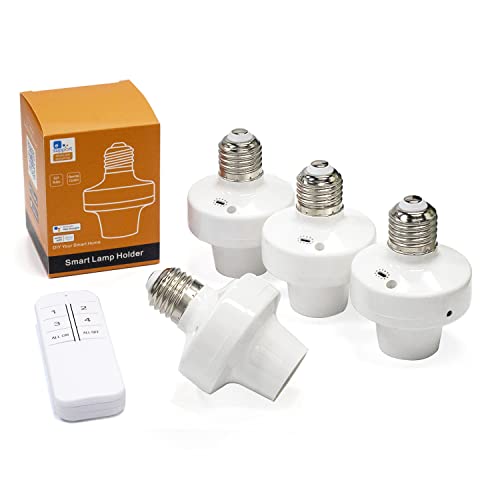
The QIACHIP Wi-Fi Smart Light Socket Adapter transforms any E26/E27 bulb into a smart device with dual remote control via 2.4G WiFi and a dedicated remote, compatible with Alexa and Google Home. Featuring app-based control, customizable timers, and group management, it offers flexible, hands-free lighting automation designed for modern connected homes.


| ASIN | B0BJ8D5XKF |
| Batteries | 2 AAA batteries required. |
| Best Sellers Rank | #146,300 in Tools & Home Improvement ( See Top 100 in Tools & Home Improvement ) #276 in Electrical Outlet Switches |
| Brand | QIACHIP |
| Color | 4 wifi sockets + 1 transmitter |
| Date First Available | October 15, 2022 |
| Item Weight | 12 ounces |
| Item model number | QA-DT05-WIFI |
| Manufacturer | QIACHIP |
| Material | Acrylonitrile Butadiene Styrene (ABS) |
| Mounting Type | Ceiling Mount |
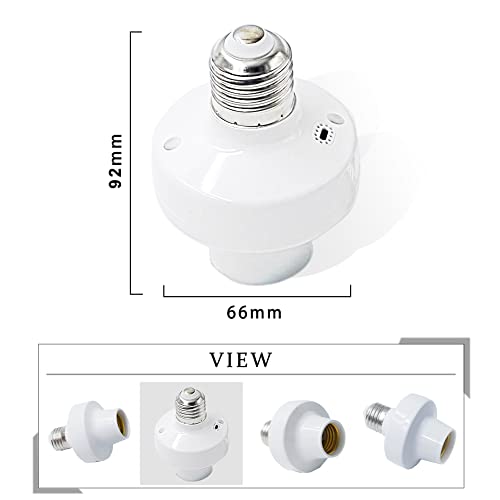
| Product Dimensions | 2.6"W x 3.62"H |
| Voltage | 120 Volts |
| Wattage | 500 watts |
H**R
Perfect! and with a remote
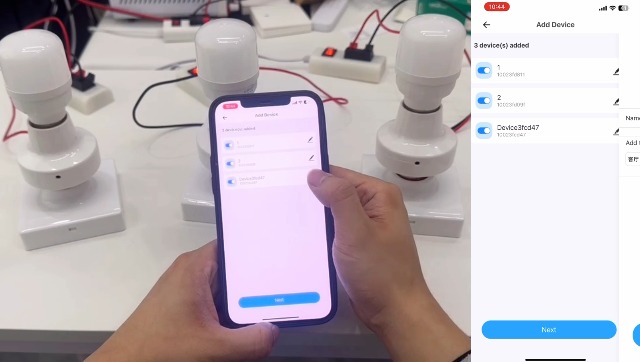
The instructions are printed VERY small and lacking some info but the product works perfect. 1. Download the eWeLink app. If you do not have Alexa app, download it too if you want to control it by voice. 2. Make sure your phone is connnected to your 2.4Ghz network. (Just for the setup) 3. Open the app and click to link to Alexa (if alexa installed) 4. Screw the adapter to a powered socket (ON) 5. Using a pen, click and hold for 5 secs the little green light led (Yes, its a button too) until it starts continuously blinking. 6. On the eWeLink app press the "+" button and then the "Quick Pairing". The socket should show. You can rename it to something you prefer. 7. To connect your remote, click on the socket device, then click on the three dots on the top right corner. Browse down and click on "eWeLink Remote". Click on the learning button and press the "1" button on the remote. Now you can go back or close the app. Thats it! TIP: If you want to still use the switch outlet as normal, go into the eWeLink app, click on the smart socket, then on the 3 dots on the top right and change the "Power on state" to "ON". But remember, if the switch is "OFF" then you cant control it using the app until is back on.
M**.
Useful and economical
This does the job described, lets you turn on and off via the app, making your socket an updated WiFi socket, perfect for the holidays. We got it for Halloween and it worked perfectly and now for Christmas and again it’s works. Now this time around we did run into trouble programming it, the app didn’t want to recognize it and even though I used it on Halloween, it was no longer in the phone app. It did took about 20min and the app didn’t want to recognize it, I read the instructions to reset and reinstalled until all of the sudden the app recognized it, that was a bummer. But after the app recognizes it, it installs in a jiffy and works as intended.
A**R
Useless- DOES NOT WORK WITH ALEXA
Useless "eWe link" app turns socket on and off at random times. Cannot be controlled by Alexa. Waste of money. Buyer beware!
E**B
Surprisingly Impressed
The old fashion dial timers WORK if you want to go cheap; Go with a Wi-FI Bulb adapter and LEVEL UP; The ability to change the On/Off Light Bulb adapter schedules with your iPhone is just 2 EASY. Connecting the WiFi Bulb to your home network is relatively easy, but not brain-dead - I had to use the blue tooth feature to connect mine. I'm not using the remote. The iPhone App is either Chinese or something Asian. Are you Surprised? Sadly, not much is made in the USA anymore. The App gets the job done. An iPhone and an App will control your entire house if you go that route - Kinda Cool and Kinda Scary. I purchased 8 to replace Dust2Dawn lights that stayed on, and stairwell lights that can be turned off during Daylight hours. Turn off lights when you have daylight and save energy and money
G**D
Alexa lighting the Basement
Works well with Alexa in my basement. it took me about five minutes to hook it up.
R**S
Must be 2.4GHz only for setup!
You MUST be either have a 2.4GHz only router, or be able to put your router into 2.4GHz only mode (turn off 5GHz) in order to set up the lights. After setup, you can turn 5GHz back on as long as your router still broadcasts 2.4GHz as well. They work great with Google Home and the app has some handy scheduling and trigger settings. All in all, they're pretty handy. I use mine to turn on all of my basement lights on together. All of my lights were on separate pull chains. Now I just leave the chains switched on and use voice commands to turn them on and off.
L**Y
Easiest to program!
So quick and easy to set up and set scene programs w my lights. App was easy too! I will buy more! They are little bigger than I expected but they fit in my light fixture so I’m good.
T**)
easy programming but only for very light loads
Why did you pick this product vs others?: i liked that it wad a 4 pack at a goofd price. easy to program, but if youiwant bright lights, these are about useless. i got some led shop lights and they will shut off after a few seconds because they are pulling mre than 15 watts. I didn't look for wartrtage restruictions when i bought it, so thst is my fault
F**N
Nécessite l'application ewelink pour une première configuration. Entièrement paramétrable avec Ewelink ou Alexa ( parmi d'autre applications) : heure, lever du soleil, éloignement du domicile, etc. ..
J**Y
Works with Alexa, but first had to activate control through the app and then Alexa could controll the socket
M**O
De momento va de lujo
J**U
Buen producto
S**E
Perfekt
Trustpilot
2 weeks ago
1 month ago


