Desertcart purchases this item on your behalf and handles shipping, customs, and support to Jersey.
🔧 Diagnose Like a Pro, Drive with Confidence!
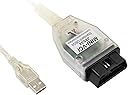
The Mini VCI J2534 Cable is a compact, professional-grade OBD2 diagnostic tool designed for Toyota, Lexus, and Scion vehicles from 1996 onward. Compatible with TIS Techstream software versions V17 and V18, it supports all essential communication protocols for comprehensive vehicle diagnostics, programming, and coding. Its plug-and-play 16-pin USB interface works seamlessly with Windows XP through Windows 11, backed by responsive customer support for software installation and troubleshooting.
| ASIN | B0CZ4C3TVM |
| Best Sellers Rank | #18,500 in Automotive ( See Top 100 in Automotive ) #122 in Code Readers & Scan Tools |
| Brand | CTobd |
| Brand Name | CTobd |
| Customer Reviews | 4.0 out of 5 stars 199 Reviews |
| Included Components | 1pc x MINI VCI 16Pin Cable ; 1pc x CD Driver1 |
| Item Dimensions L x W x H | 7.02"L x 5.85"W x 1.17"H |
| Item Type Name | Automotive;Tools & Equipment;Diagnostic, Test & Measurement Tools;Code Readers & Scan Tools |
| Manufacturer | Shenzhen Chaos Knight Technology Co., Ltd |
| Manufacturer Part Number | mini vci |
| Manufacturer Warranty Description | 1 |
| Model Number | mini vci |
| Number of Items | 1 |
| Operating System | Windows 7,8,10,11 |
| Power Source | Corded Electric |
| Product Dimensions | 7.02"L x 5.85"W x 1.17"H |
| Screen Size | 1 inches |
| UPC | 742440778582 |
W**N
Works With Windows 11 - Follow My Instructions
This kit comes with everything you need to get Techstream working on a Windows PC. Through a lot of trial and error, I got it working on a Windows 11 Pro laptop. Since then I have been able to connect to multiple vehicles to make changes and troubleshoot errors. Great software product at an awesome price. A very useful tool for the car enthusiast and do it yourselfer. The included instructions are useful, but did not work for me 100%. For Windows 11 go into Settings > Privacy & Security > Windows Security Step 1: Virus & threat protection > Manage Settings Step 1.A: Turn off all checkboxes Step 2: App & Browser Control > Smart App Control settings Step 2.A: Turn off all checkboxes Step 3: Device Security > Core Isolation details Step 3.A: Disabling all checkboxes Step 3.A NOTE: YOU MUST RESTART THE COMPUTER Step 4: Go back into Device Security > Core Isolation details - You will now see Microsoft Vulnerable Driver Blocklist checkbox available. Turn off. After finishing steps 1 through 4, you can follow the video instructions included on the disk to install all the required software and drivers. After you followed the instructions and installed everything, plug in the USB cable and go into Device Manager. Find M-VCI under Other Devices and update the driver by browsing to the drivers you installed in folder location: C:\Program Files (x86)\Autokent MVCI MultiDriver X64 Next, do the same for USB Serial Port under Other devices. I also uploaded a video of this process. I have tested these steps on multiple Windows 11 computers and I can confirm Windows does not automatically pick up the driver to use and you have to manually browse to tell the computer which drivers to use. Good luck and buy with confidence. This is a solid product.
M**S
worked perfectly
Great product that saved me hundreds of dollars. You need some technical ability to use this, but if you're even considering reprogramming your car to use different/new key fob yourself, you probably have the necessary skills. Compared to many of the alternatives that hook up to your phone, this is cheaper, and can be used with as many compatible cars as you like (vs. the others, which lock to a single VIN). I was able to use the interface in January, 2026 with a Windows 11 laptop to program my 2013 Highlander for a new key (and delete a missing one). All the software you need is on the included CD. Make sure you have a new key that is an *exact* match for the one you already have (take the existing key apart and check the markings on the PCB board in the key fob). If you're replacing a lost key, here's the overview of what you need to do: 1) Install the software on your laptop from the CD. This involves (a) installing techstream v18 (just run the installer) (b) installing the driver v1.4.8 (run the exe in the appropriate folder depending on your architecture, x86 or x64) - note you may need to disable your antivirus during this step. If this concerns you (it probably should), then you can install on a virtual machine or a laptop that you are able to wipe clean afterward. (c) run the patch / copy it to your desktop. Note that to run the software, you will actually run the "patch" shortcut and not the main desktop icon 2) plug the device into ODB port and laptop. Run the patch icon as described above and enter your vehicle information. Search for a channel called "DIY-time" on youtube, and his videos "How to program a smart key on any Toyota, Lexus or Scion" and "how to erase a lost or stolen transponder chip keys from Toyota, Lexus, or Scion ECU computer." You cannot delete a specific key. Instead, you will need to erase all keys paired with the car EXCEPT the one you have in the car when you do this, and then you can re-pair whichever additional keys you like (If you're just adding a new key and haven't lost any, then you can just add them without deleting anything). To be on the safe side, I first added the new key to make sure everything worked, and then deleted everything but the existing key, followed by re-adding the new key. It took me about an hour of research/installation to make sure I had everything working correctly, but everything worked first try and the new key fob started the car, opened the doors/trunk perfectly.
M**2
Don't waste your money
I could not get this to work. I have 4 laptops that I tried to get this working on, Windows 11, Windows 10, Windows 7, and Windows XP. Totally worthless.
B**T
Works with Toyota, software could be a challenge but not insurmountable.
After a few hours of figuring out how to get it to work, i successfully connected to the vehicle and read the code related to my ABS malfunction. The delay I had was the included drivers cd. Many modern laptops have no optical drive (no fault of the seller) so I had to figure out how to get that part to work. I used a few different guides online and finally got it working. Please be careful with random software sources and if possible use a laptop that is secure, or if compromised it poses no risk to you. Can’t say much else other than it works; the software may or may not rely on your resourcefulness. Confirmed working with a 12 year old Lexus.
J**.
Good… after DIY and troubleshooting.
Buy this simply for the cable itself, at $40 the price is unbeatable compared to OEM equivalents. I am leaving 3 stars because of how much of a chore it was to get it working. It ships with v18 and v17 of the software which works perfectly for cars only communicating on CANBUS. My 2008 Prius uses CAN and K-Line communication which works with v12 of the software. If you have any ~2010 and older Toyota product, download the ih8mud virtual machine image and pass the cable through to that, and find the ‘cmd’ FTDI drivers file and auto install those, in order to have communication with all ECUs on these older cars. Another reason I am leaving 3 stars is due to the poor quality control of the product. Even after switching to v12, I still could only communicate with the CAN side, so, I ran a check with techstream for the cable and discovered my K-Line pin (#7) was not responsive. I ended up opening the cable housing and seeing that this pin was the only one with incomplete soldering. After re-soldering it, it worked perfectly and performed a full health check on my Prius and communicated with all 16 ECUs. So, the long and short is, this product is great for the price, my other option was pay a locksmith $125 to maybe reprogram the smart portion of my new keys for the Prius, this was certainly better, just takes FAR more technical know-how. Just remember to use the v12 virtual machine and install the drivers already on that machine once you pass through the cable in the USB settings and see if all pins are connected.
J**H
Did not work, burnt odor from a healthy laptop when connected.
I was prepared to deal with all sort of issues as many other people reported. From needing to using the older OS to getting a chance to get a defective device. I followed the steps and initially it seemed to work. I connected it to my laptop and the cable light turned green. But I am lucky I let it stay connected for some time. The device crashes both of my computers after X number of minutes. I am glad I did not start programming and caught the problem early. I gave this device every chance, went through multiple guides but after I smelled a slight burning smell from my laptop, I decided that it is enough. I am not saying that all of these are bad. I saw the review and they gave me optimism. But I most likely got a bad one. If you experience anything like this, I recommend replacing this device or look for a different option. In conclusion, what I heard about this device appears to be true. It is a very cheap device imitating more expensive professional ones. It is nice to be able to program keys for this cheap, for example, but that also gives a chance of losing a lot of time like it was in my experience. Above all, I recommend you to be watchful if you use this cable. Watch for anything strange when you connect it to a laptop. And if you have a crash with a fatal error, you should not use it.
T**R
Technical Know How Required
I purchased this Mini VCI cable (Auto Kent / XHorse style) for use with Toyota Techstream, and while it ultimately works, getting there was far more involved than it should be. The good: Once everything is set up correctly, the cable does function as intended. It communicates with the vehicle, Techstream recognizes it, and diagnostics work reliably. From a pure functionality standpoint, it does what it claims. The reality (setup experience): Out of the box, this is not plug-and-play—especially on modern systems like Windows 10/11. The cable uses an older FTDI-based interface that is not natively supported the way newer diagnostic tools are. Windows immediately detects it as a generic USB serial device, which actually interferes with proper use. To get this working, I had to: Set up a Windows XP virtual machine Troubleshoot USB passthrough issues extensively Convert a virtual disk from VirtualBox to VMware due to compatibility problems Install legacy VMware Tools manually just to get basic mouse and display functionality XP with the appropriate Techstream software did not require any additional driver installation beyond that environment. This is not a beginner-friendly process. If you are not comfortable with virtual machines, drivers, and older operating systems, this will be frustrating. Important note about the included disk: I did NOT use the included CD, and I strongly recommend against using it. These disks are often outdated and can pose security risks. It’s much safer to source clean, known versions of the required software and drivers yourself. Final verdict: ✔️ Works once fully configured ❌ Very difficult setup on modern systems ❌ Not plug-and-play despite how it’s often marketed If you’re willing to put in the time and have some technical experience, this can be a cheap and effective solution. Otherwise, you may want to consider a newer J2534 interface that works natively on modern Windows without all the extra steps.
G**W
This Cable Really Does Work
This one actually works with all features. I have tried other Mini Vci cables and software and they did not have full functionality. If you want to have dealer level access this is the one to get. The Utilities are accessible with this setup and that is what you will need for high level customization and service. FYI version 17.x and 18.x are included so you can choose which you want to use. I did v.18 and it is fully functioning.
D**A
Excelente y eso que no soy mecánico.
Excelente, la verdad al principio crei que era algo dificil de usar pero en youtube hay bastantes videos que te dicen como usarlo y como instalarlo. Con eso me di una idea de como instalarlo y seguí las instrucciones. Me ayudo a arreglar mi camioneta, recomiendo que consigan los manuales de taller ya que ahí dicen los códigos que arroja y como arreglar el problema.
A**R
Request link
Are you receive the item but the CD not working with me can i have link to download
J**L
CD arrived broken
I was unable to use this product because the CD does not work properly, so I couldn’t install or run the software at all. As a result, the product is not functional and does not serve its purpose.
Trustpilot
3 weeks ago
2 weeks ago